

Property Tax
Counties mail property tax bills twice a year. Some tenants pay the county directly, some reimburse us, and on vacant land we pay it ourselves. The job is making sure every bill is accounted for, nobody pays twice, and nothing goes delinquent.
Monday tracks whether a bill arrived and where it stands. AppFolio records what was paid and by whom.
Who Pays
Recorded in the Who Pays column on the board.
| Case | Pays the county | Our obligation |
|---|---|---|
| Owner-paid or vacant | We do | Pay as a normal payable |
| Bill back or CAM | We do | Pay, then recover from the tenant |
| Tenant pays direct | The tenant | Send the bill, confirm payment, zero the bill in AppFolio |
Send the bill to every tenant regardless of the case. Tenants often pay even when the obligation is ours, and a responsible tenant is waiting on our email before acting.
Intake
-
Receive the bill
Hard copies, email, or pulled from the county website. -
Process it
Run the PDF through the Document Preprocessor’s Property Tax page. -
Verify the details
Confirm the board item, amounts and due dates. -
Save
The PDF goes to the server and the Monday item, amounts and due dates are filled, and every installment is set to Statement Received.
Selecting the Board
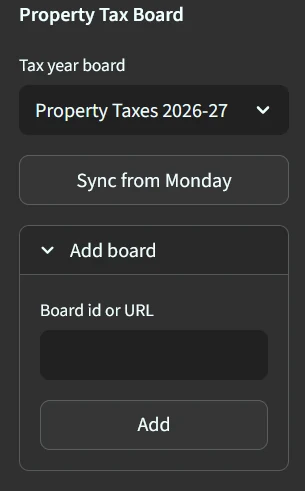
Pick the tax year board at the top of the sidebar. Sync from Monday refreshes the cached properties and parcel numbers. Run it after any change to the board.
Each tax year has its own board. To add one, expand Add board, paste the board id or URL, and click Add. Columns are found by name, so a board duplicated from last year needs no further setup.
Processing a Bill
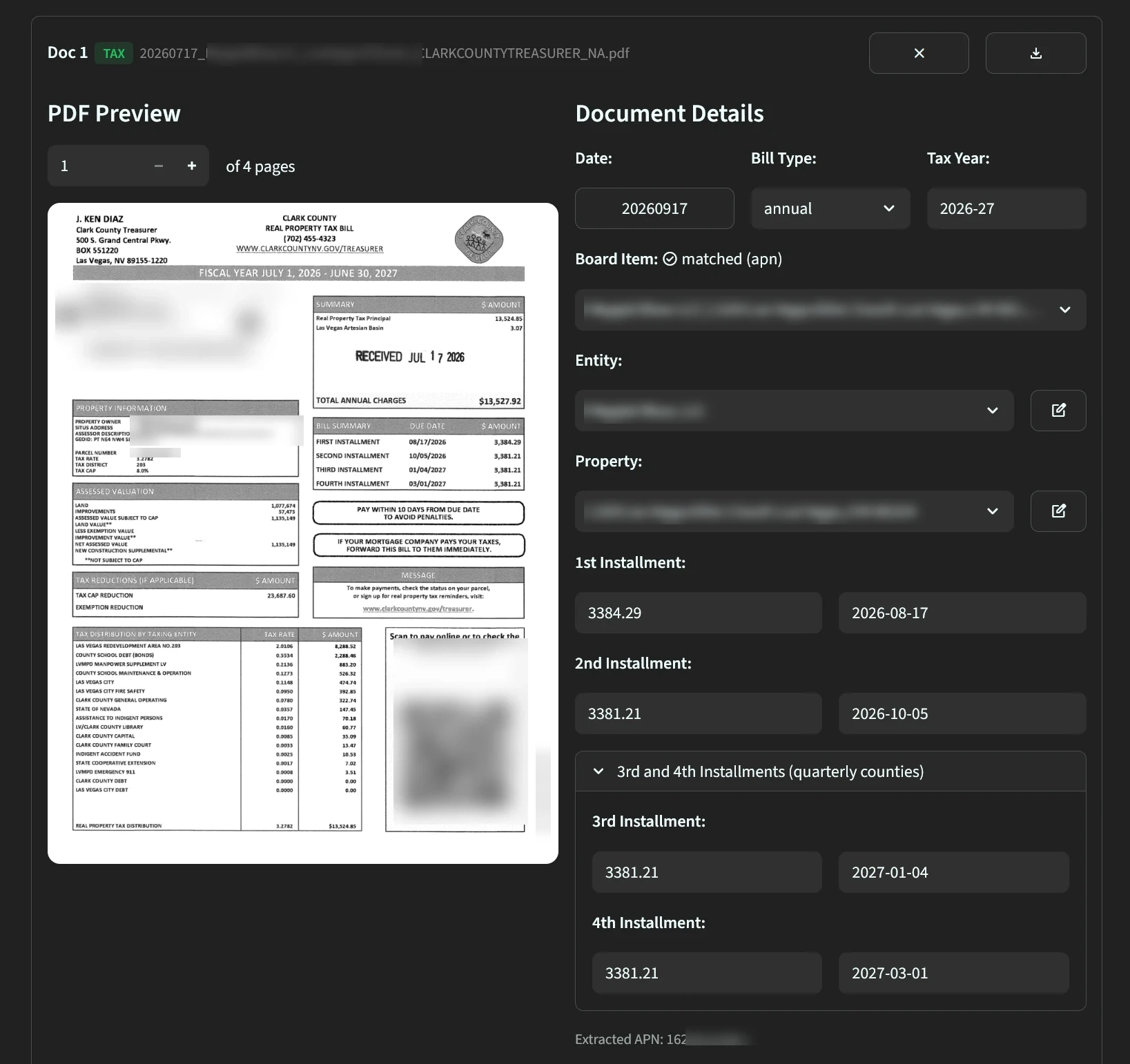
The preprocessor reads the parcel number, tax year, bill type, and every installment amount and due date, then matches the bill to its board item.
- Board Item shows how the match was made.
matched (apn)is an exact parcel number match. Anything else needs review, and the dropdown lists every property scored against the bill - Entity and Property set the filename and server folder. Use the pencil to override
- 3rd and 4th Installment open automatically when the bill has them, which is Nevada and Massachusetts
- Extracted APN shows what the match ran on
Amounts and due dates must reach the board before anything downstream works. The payment sync compares what AppFolio paid against what the board says is owed. Statement Received comes first, paid comes second.
Bills Requiring Review
| Situation | Action |
|---|---|
| Supplemental bill | A second bill on the same parcel. Process separately |
| Multiple parcels on one property | Several bills against one item. Process each |
| Parcel number unreadable | Select the item from the dropdown |
| Property sold | Marked SOLD on the board, never chased |
Sending to the Tenant
-
Send on receipt
Blast from the property tax mailbox through SuperMail with the PDF attached. Do not hold bills for a batch. -
BCC accounting
The same send BCCs the EMA accounting email, which auto-forwards into AppFolio Smart Bill Entry. This is how the bill reaches AppFolio, so the BCC is required. -
Chase weekly
Until the tenant responds or the county shows the bill paid.
Recording in AppFolio
The BCC enters every bill, including bills we never pay, giving one searchable record regardless of who paid. REA posts them from Smart Bill Entry against Real Property Taxes, the default GL account for all property tax entities. Supplemental bills use the same account.
For a bill the tenant pays directly:
-
Zero the amount once the tenant confirms payment or the county site shows it paid.
-
Note who paid on the bill:
Tenant paid,Charles Dunn paid, or similar. This is the only record of who settled it.
A zeroed bill stays searchable, never appears as an outstanding payable, and does not touch the P&L.
Paying
Bills we owe run through the normal AP approval and payment cycle.
Once paid, the daily payment sync marks the board. It matches on the property, the GL account, and the exact installment amount.
| AppFolio record | Monday status |
|---|---|
| Paid from Real Property Taxes | Paid by Landlord |
| Paid from CAM Real Property Taxes | Paid by LL Billback Tenant |
| Tenant reimbursement receipted | Tenant Reimbursed |
The sync only moves a status forward, reports rather than writes a payment that does not match the board amount, and never touches a property whose tenant pays the county directly.
Confirming Payment
This cannot be automated and is where money is lost if it slips.
-
Get it in writing
A tenant saying they paid is not proof. Ask for a receipt or screenshot. -
Check the county weekly
Work the board from the top. Every unconfirmed item gets checked. -
Keep checking for ten days after the due date
In case a late-posting payment lands. -
Mark the board
Record confirmed payment with the proof attached.
Exceptions
Short and partial payments. A tenant who pays the wrong amount, or misses a late charge, leaves a balance the county will chase. Scan the remaining notice, send it to the tenant as a bill back, and recover the difference. Penalties caused by the tenant paying late are theirs.
Prorated tenants. A tenant who moves in or out mid-year owes part of the bill. Invoiced separately, split manually.
Corrected bills. Process as a new bill, resend, and correct the amounts on the board.
Weekly Cadence
| When | What |
|---|---|
| On receipt | Process the bill, send to the tenant, BCC accounting |
| Weekly | Check unconfirmed items against the county site, chase non-responders |
| Weekly | Approve and pay what is ours |
| Ten days after each due date | Confirm late payments, bill back any shortfall |